Posts

Showing posts with the label WRE

How the fate like to play with us (3rd generation of RTTI)

Life bring to us surprises everyday but today I was impressed how fate works. Whole story started few years ago when I decided to make my own RTTI system for White Rabbit Engine. Then I was still young and naive and thought like everybody at this age that I know how to write complicated systems. This experience teach me that I really can write complicate systems ... but not necessarily should. System was working fine but was over complicated and resulted in lot of stability issues. This realization lead to the series of improvement. I like to call it 2nd generation of RTTI system. Changes are covered by  on of my posts . This was already big step: system was simpler, easier and what most important more stable. This sentence could probably end this story if not the fact that I always felt that it is still not final form of this piece of code. This wasn't what I fully wanted. There was one particular feature that I struggled to add but failed to achieve: virtua...

Catching up

There is so much going on this year that I don’t have too much time to write posts. For this who don’t follow my other blog this is some summary of most important changes: In February I started working for Unity Technologies. Engine slowly transit to Physics Base Rendering (PBR). I released new video https://youtu.be/q6Ql9MX4baM with game progress. Been at Unity HackWeek XII (I’m even on one of photos at blog, find me if you can :P) Dropping kinematic character physics in game. Now that I think about it each of this points could be separate post. But well there is no point in thinking about past and let’s focus on present and topics I work on in the same time: PBR transition. Physics changes. Game not working smooth. PBR transition This slow down a little bit because I try to read in free time recommended by friend moving frostbite to pbr . I start to see how much knowledge I missing to do it properly. There is all this sections about lights par...

Editor disaster ...

Image
So I'm still waiting for starting of my new job in Unity Technologies so I have some spare time. I use it to see Copenhagen, drink coffee, meet new people and of course as always: coding.  This time in my coding journey I try to figure out reason behind my slow reaction time of editor. My windows machine handed everything perfectly fine but my a lot slower laptop with Linux gave terrible results :/ How bad? I tried to rotate scene and there was few second delay between action and reaction So really bad. There was no choice but to fix it. 

Resource building

Image
As you may notice I like to push my tech to it's limit. Because of that I recently decided to switch to a lot better way of building resources. I took my app that were containing everything and split it on 3 different one. They run as separate processes which connect with each other using TCP/IP. Comparing to previous setup this solution have a lot of advantages and this is some of them: If one node crash I can just restart it and run whole setup further. Whole node setup is scalable so I can have 100 of nodes. I can run nodes on different machines.  I can dispatch new version of building nodes to different machines automatically. I can build specialized Python nodes for some of work. Application don't need to have all this shitty code of resource compilation. Whole concept became a lot easier to control. So as you can see there is a lot of improvement :) comparing to previous one.

Code pollution

Image
Well time fly by and animation system starting take shape. Thanks to it I could do even some not bad looking animations in game (http://coffemonsters.blogspot.co.uk/2016/05/lba-preview-15.html) but well this is just another milestone in road to finished game.  Because of this thoughts I already moved to next issue: recovering of movie system. So far its going fine I added new movie resource, movie editor module. No I starting adding basic functionality: adding keys. This operation require list of selected objects in level. This part was designed great :D Because I can have N levels loaded in memory in the same time I created new level component which exist only in editor. It contain some editor specific data i.e. selection. It's added on loading from editor and it's not saved with level. When you want list of selected objects just pick component from level and I have access to selection. Great idea right ?  I thought this way when I was writing it. Right now I...

Plans, real life and monkey job.

Funny thing about planning is that sometimes its not working out the way you want. This was case this week I planned to work on animations and ended doing small upgrade for resource system. The best thing is that I don't even feel bad about stuff ending this way :D  How I ended doing that is other story. Because I have policy of moving everything what I can to resource system which I have (this make stuff more consistent) I moved my rendering script to it. Everything would be good if not the fact that render script is initialized on main thread and my resource system never was prepared for request from other thread than game thread. So it was time to do improvement to allow for this :D This was even more important because there were sometimes crashes at startup of game. I split my task on 3 sub task: Access to resource data require locking of resource (i.e. meshRes->lock()->getMaterial();) Separation of resource from data so you could have resource handle and it ...

After break

Image
I took some break from writing on this blog but I had busy last few months. In this time I done a lot of changes in engine one of biggest "finished" one are changes in file system. But this time I don't to talk about what I done but more about what will come and what I working on right now. And I do some stuff with which I'm not feel most comfortable: Animation system. So I decided to seek some advice and explain what I do, why and how I would like to improve it. So be free to comment and critique. I don't fell that system I have right now is what I really want to have. This is this weird felling when you fell that system that you created is working but you fell that it's limiting you. Because of this felling recently more often I turn of computer and sit down with pen and notebook and think what I really want to do with this system. So far my conclusion is because I'm iterative develop White Rabbit Engine technology I didn't notice till n...

Generated code

When two months ago I created generator for RTTI code I didn't realize how this one script will change so much in my programming style. Right now I have already four of generators in my code base: RTTI - Generate part of my RTTI code. SID - Generate CStringID with already calculated hash Pimpl - Generate interface class. Enum - Generate toStringID, fromStringID functions. So what changed for me after writing this one generator that make difference ? I try not to do monkey job . To show you how this improve my workflow let's look on generator I wrote today: Generator of Enumerator functions: toStringID, fromStringID. This is simple problem where for some enumerators we want to have conversion from value to some verbose type. Some people may claim that this is not issue. You write functions once and they work. Later you just need to modify them when you do some changes in enum. This take like about half minute work  ... if we don't do mistake there. Then thi...

Tools Design

Image
Variable Set Editor - Main view Continuation of previous post :] this time with real examples :D Real tools design  This may look like joke but this one window took me ~3 days to do. This include all it's features and communication: Editor Engine. But this is reality. Creating good tools require time and I wasn't joking in  Summary  from previous post: "As you can see creating of good tools is not easy. You often need go back and forth to create something really useful. You don't want to modify everything by scripts in which you can make easily mistake. Good tool will for sure save you a lot of work and return effort that you spend on it." 

Animation System Changes: Part 1

Image
After weeks of work (probably I could even say months) and hundred resolved tasks and bugs new animation system finally start working ;] Check final effect: If you think that it is look no different from my old animations then you are almost right :D Currently this new system have even less functionality than old one. Because of that I needed to disable big part of gameplay. Was it worth it ?  Short version : I think that: YES. 

UI

It's funny that only with time and experience you start to understanding how hard UI code is. I remember a lot of situations when UI freeze in meantime of doing something. Whole window is locked and you just prying that its still alive. First version of my tools were similar: everything happening in one thread which was block when I was doing some longer operation. Because there was not too much to process it was not so painful. With time this changed, amount of data grow. To fix the issue I started adding progress bars to some operations and was happy. Sadly I was still wrong. This solution is still messy. I block whole UI and just update progress bar when some operations may be processed in background. Recent change of threading taught me beaut of asynchronous operations. Right now all my communication Engine UI is happening by events which cleaning my design of whole tools. All code where I mix UI with mechanics changing in creation of event and processing of it later. Be...

Component system

Image
This time some more technical post about components system that I work on. So lets start from begin :) Making decision about switching to components took me almost year. Seem like pretty long time to rethink everything. But not necessarily when you need to change big part of your code base. So I focused on finding all pros and cons behind new system. In meantime I had a lot of talks with programmers friends in Poland and here in Canada. Thanks to them I was able to create my own opinion and vision what I want to achieve with this new code.

Few words about remake

Image
Time is something funny we don't notice when but it pass by so quickly. Few months ago I announced release of this pre-alpha build. Then it was so far away right now only a little bit more then month left. You probably wondering what changed in this time. So below you will find some summary of biggest changes (from my point of view): Component base architecture  Decision on big changes in engine architecture aren't easy. I think that transition from class base approach which looked like that : class CGameObject class CModelObject : public CGameObject class CPuppetObject : public CModelObject class CChcaracterObject: public CPuppetObject  to component base ( like in Unity 3D ) was one of the biggest and most problematic changes that I done in White Rabbit Engine in last years. I needed to change a lot of code, don't break the game that I have and in the same time change my approach to resolving problems.  Level Editor : New com...

New year coming ..

Image
.. and so some news related to L.B.A. Remake and I think it's something good. This last few months were I would said pretty tough. A lot thing changed in this time I changed my job and with it place where I currently live but there are things that never change. One of them is my family other are friends and the last one is that I never stopped doing L. B. A. remake :]  So once again : project is still alive. But this time I have some proof for that :]  This may look not too much at first sight but truth is that behind a lot of things changed and changed on better. But better solutions came with price: doing them consumed more than two months of work. This is a lot of time at last for me. But this time is behind me and from now one there should be only better. In the fact effects of the changes that I mention before are still visible and not everything work the way it should but each day stabilize everything and even make some things work a lot better. S...

Tech talks: placement new

So another post under sign of programming. This time: placement new. So lets's look on this part of code :     ... if (techData.texturesCount[idx] > 0) {     tech->m_textures = new(memoryPtr) STextureSlot[tech->m_texturesCapacity];     memoryPtr += sizeof(STextureSlot) * tech->m_texturesCapacity; } else {     tech->m_textures = NULL; } ... It's a part of White Rabbit Engine materials creator. It's purpose is simple : allocate memory for material + techniques + textures slots. And use placement new to create objects. Everything so all materials data was put in continuous memory. Of course it's nice but there is one problem : this part of code is wrong. Everything look nice but placement new for arrays add additional data about array before objects. So   new(memoryPtr) STextureSlot[tech->m_texturesCapacity] use more memory than :   sizeof(STextureSlot) * tech->m_texturesCapacity; For me this m...

Multithreaded rendering (Part 3)

Image
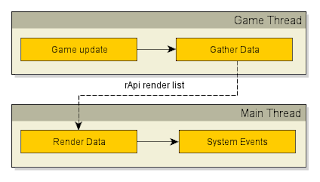
After "little" break lets return to topic. Last time we ended on system that was already split on two threads. This week we will focus how to change it so it work the way we wanted: So let's start from analyzing a little more situation on which we ended  in last part : This model look already pretty good and would be enough in some situation. We can use it in this way : Place marked as " Sync " mean time in which "Gather Data" wait till rendering finish using  rApi render list (buffer contain all information's need to render frame). As we see game can update in meantime of rendering. So everything should work faster than in one thread.

Tough times ...

Really tough times came to project. To be precisely it's developed on really powerful netbook acer Aspire One 522. Right now I don't have access to my normal computer and this is only hardware that I have. But don't worry project didn't stop but only going a little slower. To show how much: on my PC project fully recompile in around 3 minutes on netbook the same thing take more than 20 minutes. The same problem is with loading of game which time also extended few times. So it's not easy but I use this time to speed up everything so I could normal work. It's going really nicely: Right now loading time decreased. In the same time performance increased. Everything mixed with stability changes which are done every time when there is occasion. Only problem right now is that game is in a little stagnation but I believe that in few nearest weeks this state should change.  I think that in next post I will return to multithreaded rendering topic. Right now...

Multithreaded rendering (Part 2)

Image
So in last post on this topic I described a very general look about what is happening inside threads and show some problems that I found in meantime of prototyping. This time we will look a little more on solution that is use in White Rabbit Engine. And few things here: Starting from this post I will change a little convention of naming rendering Api. I will use name OpenGL  in situation when problem will be 100% connected to it (i.e. extensions, bugs etc.) for everything else I will use rApi so text be a little more general. I don't claim that this solution is something really innovative and I will surprise you with it. I still work on this system and there is really big probably that some part of it will somehow change in future. So after this short intro let's move to main topic. As was mentioned earlier engine slowly switched from single thread solution to multiple. Initial loop looked something like that: First thing that changed was [ IO update ] that wa...

Inconsistency naming convention

And another more technical post :] Today I had occasion to fix some functions in my rendering code. It was look somehow like this:  struct GPUBuffer {     uint32 openGLBufferId;     uint32 offset;     uint32 size; }; ... class CGraphicsManager {     ...     /** @brief Create geometry buffer. */     bool createBuffers( GPUBuffer* a_buffer,  uint32 a_sizeInBytes,  uint8* a_ptr,  bool a_dynamic);     /** @brief Flush memory of geometry buffer. */    void flushBuffer( const GPUBuffer& a_buffer,  uint32 a_offsetInBytes,  uint32 a_sizeInBytes, const uint8* a_ptr);              /** @brief Destroy geometry buffer. */     void destroyBuffers( GPUBuffer* a_buffer);     ... }; So nothing special but I seen here two inconsistency in code convention. First is that once I use ...

Multithreaded rendering

This time more technical but I think it's really interesting stuff for some of you :] More than week ago I created new branch on my git repository containing code for "multithreaded rendering". Problem like this are never easy and in my case I needed to deal with OpenGL. And for this who don't know OpenGL is state machine and because of this isn't parallel friendly. All creation of resources, uploads of data, rendering and releasing of it need to be done on the same thread where context were created. So you see a lot of restriction which complicate already not easy problem. Personaly I thought about solution of it from some time already but couldn't found any that would fit my needs. In most cases there were problems how nicely fit it into my architecture, how to deal with synchronization and few other stuff. But not so long ago I found at last way to deal with it and of course didn't started to code it In last few years I learned that if we have an...